
Turning sound to sight with the Audio-To-Waveform AI Model
Turn spoken audio or music into a waveform using a simple AI model
Audio waveforms are visual representations of audio signals over time, depicting the varying frequencies and amplitudes that comprise sound. Waveforms allow us to visualize audio in a tangible way, turning intangible sound into a concrete shape that we can see and analyze. In music production and analysis, waveforms are indispensable tools for visualizing and editing audio tracks. However, generating waveform videos from audio files traditionally requires specialized software and technical expertise. This is where AI comes in.
Subscribe or follow me on Twitter for more content like this!
The audio-to-waveform AI model created by fofr on Replicate provides an easy way to convert audio files into waveform videos programmatically. This model takes audio input in common formats like MP3 and WAV and outputs a video file showing the audio's waveform. With just a few lines of code, anyone can leverage the power of this model to turn sound into sight through generated waveforms. Whether you want to visualize music tracks, create engaging video content, or build audio analysis tools, this model enables audio-to-video conversion without the need for complex setup or prerequisites. By democratizing access to audio waveforms, this AI model unlocks new creative possibilities for working with sound and music.
Use Cases
The audio-to-waveform AI model has a diverse range of use cases across music, video, and audio analysis.
In music production, the model can be used to generate waveform videos for analyzing tracks. Musicians and producers can visualize the waveform to easily see the structure of a song, such as when choruses and verses occur. The waveform also depicts volume and frequency changes, allowing for informed mixing and mastering decisions. By integrating this model into digital audio workstations, musicians can access waveform visualizations without needing to export files and use external software.
For video editing, this model enables creating engaging waveform effects and transitions. Users can input audio tracks and dynamically generate stylized waveforms to layer into their videos. This is useful for audio visualizations, title sequences, transitions, and more. The customization parameters give flexibility for waveform styles too.
Finally, for audio analysis products and platforms, the audio-to-waveform model provides an easy way to add visual waveform representations. Rather than building complex waveform generation tools from scratch, developers can simply integrate this model to visualize audio uploads or samples. This allows rapidly prototyping and launching audio analysis tools for end users.
Overall, the model opens up many possibilities for music, video, and audio applications thanks to its versatile audio-to-visual conversion capabilities.
Inputs and Outputs
The audio-to-waveform model accepts a single audio file as input. This can be in any common format like MP3, WAV, FLAC, etc.
There are also several optional input parameters for customizing the waveform visualization:
bg_color- Background color of the waveform videofg_alpha- Opacity of the foreground waveformbars_color- Color of the waveform barsbar_count- Number of bars in the waveformbar_width- Width of each barcaption_text- Caption text to display
These input customizations allow flexibility in styling the waveform video for different use cases and creative preferences.
The output of the model is a video file showing the waveform rendering. The video format depends on the API or library used to interface with the model. For example, using the Replicate API outputs an MP4 video file.
How to run the model
Now that you understand the inputs and outputs, let's see how to run the model using the Replicate API.
First, install the Python client:
pip install replicateNext, copy your API token and set it as an environment variable (use your own!)
export REPLICATE_API_TOKEN=r8_*************************************Then, you can simply run the model:
import replicate
output = replicate.run(
    "fofr/audio-to-waveform:116cf9b97d0a117cfe64310637bf99ae8542cc35d813744c6ab178a3e134ff5a",
    input={"audio": open("path/to/file", "rb")}
)
print(output)
You can modify this section of the code to pass in any of the input values you'd like.
Check out this example from the Replicate page for a flavor of what this model can do - in this case, providing a visual waveform guide for a short poem read by a text-to-speech narrator (further reading on that here).
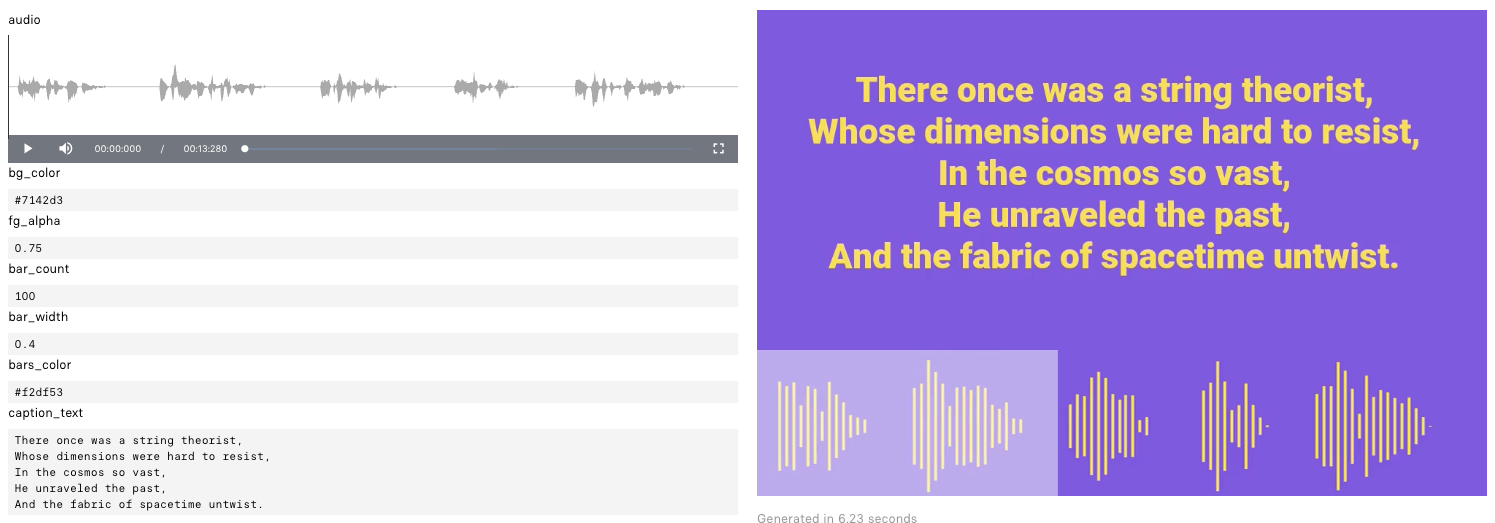
Here, in addition to the supplied audio file, you can see the influence of the other model parameters like the background color, bar count, and caption_text.
Conclusion
The audio-to-waveform AI model provides an efficient way to convert audio files into engaging waveform visualizations. With its audio input and video output, this model bridges the gap between sound and sight.
Use cases across music, video, and audio analysis can benefit from the automated waveform generation this model enables. Everything from visualizing music tracks to creating waveform transitions and effects is possible.
While the model currently only accepts audio input, future iterations could look to accept video input and overlay waveforms. Additionally, supporting interactive waveform editing within the video output could deliver even more value.
But even in its current form, the audio-to-waveform model unlocks new creative potential for working with audio and video. By turning raw audio signals into tangible waveforms, this model brings sound alive visually.
Subscribe or follow me on Twitter for more content like this!
Further Reading and Resources
Here's some more reading you may find helpful.
- View the audio-to-waveform model on Replicate - The official model page showcasing capabilities, pricing, and example usage.
- Check out the model code on GitHub - Source code for understanding the technical implementation.
- Learn more about using Replicate's Python API - Documentation on integrating the model into your own applications.



Comments ()